LoggFi · India
WiFi temperature data logger for connected facilities
A WiFi data logger records temperature at set intervals and sends readings to a cloud dashboard through your facility’s wireless internet connection. LoggFi WiFi models support remote monitoring for cold rooms, laboratories, hospitals and warehouses in India.
When to choose a WiFi logger
Choose WiFi when the monitoring point has reliable wireless coverage and your team can provide network access. It suits fixed installations where you already maintain an internet connection.
LoggFi is offered by Bagmo Private Limited in Kochi, Kerala. Discuss your facility, sensor requirements and deployment location in India with our team before selecting a model.
Compare GSM data loggersWill a WiFi data logger work on my network?
LoggFi WiFi models use your facility’s wireless internet connection and do not need a SIM card. Before ordering, have your IT team and LoggFi confirm compatibility for the exact model and network.
- WiFi band and authentication
- Confirm the supported frequency band and security method. Compatibility with 2.4 GHz, 5 GHz, enterprise authentication or captive-portal login is not specified in the published catalogue.
- Internet access and network rules
- Ask for the connection requirements your IT team needs to approve, including any destination, port or firewall rules. WiFi signal alone does not establish cloud connectivity.
- Signal at the monitoring point
- Test the logger in its intended mounting position with refrigerator or cold-room doors closed. Insulated walls, shelving and equipment can affect the connection.
- Power for both logger and network
- Plan power for the logger, WiFi access point and internet router. The logger’s offline capacity and battery backup do not keep the facility network online.
Which WiFi temperature logger is best for a laboratory?
The best fit is a logger whose probe range and accuracy meet your laboratory’s requirements, whose calibration covers your working temperatures, and whose connection works on your lab’s network. Compare those requirements before choosing a display, humidity sensor or alarm option.
Accuracy at your working temperatures
Use the catalogue accuracy in the model table as a starting point. Ask for the specification of the complete supplied probe and logger at your operating temperatures, including any conditions or limitations. A wider measurement range alone does not mean better accuracy.
Calibration evidence
Specify the calibration points your lab needs and ask which certificate is included. Confirm the probe/device identification, calibration results and uncertainty, traceability, and recalibration arrangements. The catalogue’s internal / NABL entry does not establish the certificate supplied with every order.
Compatibility with the lab’s WiFi
Ask LoggFi and your IT team to confirm the supported WiFi band and authentication method, any captive-portal or enterprise-network restrictions, and required internet access. Check signal strength at the installed logger, with refrigerator doors closed and equipment in place.
Alerts your team can act on
Confirm temperature thresholds, logging and upload intervals, alert recipients, and charges for the configured call, SMS and email services. Demonstrate an out-of-range reading and who receives the alert. Remote notifications need connectivity; local recording alone cannot deliver a cloud alert.
Plan separately for network outages and power cuts
At a five-minute logging interval, WTD102's 2,000 readings cover approximately 166.7 hours of storage. This assumes an empty buffer, continuous power and one stored reading per interval.
Storage capacity is not battery runtime. The catalogue lists battery backup as 20 – 30 hrs typical. Confirm what happens when memory fills, how readings upload after reconnection, and how the device and network will stay powered. Cloud updates and remote alerts still need a working connection.
Calculate storage for your logging intervalWhich WiFi data logger model should I buy?
Use your application to shortlist a sensor family, then compare the models below. This guide compares LoggFi configurations using the published product catalogue; confirm the supplied assembly and service terms in your quotation.
Routine temperature monitoring
Start with the NTC models for refrigerators, rooms or storage areas whose required temperatures fit the listed range. Choose an OLED model when staff need to read the temperature at the device.
Catalogue temperature range: −40°C to +50°C
Before choosing: Confirm the required accuracy and probe placement; use a different probe family if your working temperatures fall outside this range.
A wider temperature range
Compare PT100 models for laboratory equipment or processes that need a wider measurement range. Display and compact versions are available for each connection type.
Catalogue temperature range: −200°C to +400°C
Before choosing: Confirm probe construction, mounting and calibration at your working temperatures. The probe range is not the operating range of the electronics.
Temperature and humidity together
Compare Hygro models for rooms or storage areas where relative humidity matters as well as temperature. These models include an OLED display.
Catalogue temperature range: −40°C to +50°C
Before choosing: The catalogue lists the humidity range but not humidity accuracy. Request humidity accuracy and calibration details for the supplied assembly.
An audible alarm at the site
Compare SonicGuard+ models when nearby staff need a hooter alongside the configured remote alert service. Confirm whether your quotation includes a display.
Catalogue temperature range: −40°C to +50°C
Before choosing: Ask for a demonstration of the local alarm during network and power interruptions; do not assume its behaviour from the presence of a hooter.
WiFi data logger models and specifications
Select the sensor first, then the display and alarm options. Temperature ranges refer to the sensor; the electronics have a separate operating environment.
| Model | Sensor / family | Temperature range | Accuracy | Display | Offline readings |
|---|---|---|---|---|---|
| WTD102 | LoggFi NTC | −40°C to +50°C | ±0.5°C | OLED | 2,000 |
| WT102 | LoggFi NTC | −40°C to +50°C | ±0.5°C | None | 2,000 |
| WTD102PT | LoggFi+ PT100 PT-100 | −200°C to +400°C | ±0.5°C | OLED | 2,000 |
| WT102PT | LoggFi+ PT100 PT-100 | −200°C to +400°C | ±0.5°C | None | 2,000 |
| WTD102HM | LoggFi Hygro NTC & SHT20 | −40°C to +50°C | ±0.5°C | OLED | 2,000 |
| WT102A / WTD102A | LoggFi SonicGuard+ NTC | −40°C to +50°C | ±0.5°C | Optional | 2,000 |
Hygro models also monitor 0–90% RH. Call, SMS and email alerts are listed in the catalogue; confirm the service configuration and any recurring charges in your quotation.
- Logging interval
- 1 – 40 minutes
- Input / charging
- 5V USB
- Battery backup
- 20 – 30 hrs typical
- Enclosure
- ABS Plastic · IP4X
- Operating env.
- 10 – 40°C · 30 – 70% RH
- Calibration
- Internal / NABL
Confirm the probe-specific accuracy, calibration points and certificate scope for your application. Battery backup is typical and depends on operating conditions.
How real-time temperature monitoring works
A connected data logger lets your team review readings remotely as they reach the cloud. To choose a real-time data logger, compare the recording interval, upload frequency and alert delivery time separately.
Record a reading
The probe measures temperature and the logger records readings at the configured logging interval.
Upload through the network
The logger uses facility WiFi and internet access to send readings to the cloud.
Review the dashboard
Your team views uploaded readings and temperature history through the cloud platform. Check the reading timestamp when assessing current conditions.
Receive a configured alert
Remote notifications help the responsible person respond to an out-of-range condition. Delivery depends on connectivity and the configured alert service.
How quickly will I see a reading or alert?
- Recording interval
- Catalogue setting: 1 – 40 minutes. This describes recording frequency, not a guaranteed dashboard refresh or alert time.
- Upload frequency
- Confirm the upload configuration for your chosen model. A measured end-to-end upload time is not published here.
- Alert delivery
- Ask for a demonstration with your thresholds, recipients and notification channels. No measured delivery-time guarantee is published here.
What happens when the connection fails?
Listed WiFi temperature models store up to 2,000 offline readings while powered. New cloud readings and remote temperature alerts need a working connection. A last uploaded reading cannot establish the current temperature during an outage.
Before commissioning, confirm the full-buffer policy, how stored readings upload after reconnection, and any local alarm operation. Test power backup separately from network recovery.
Estimate offline storage durationWhat to check in a monitoring demonstration
Ask the team to record the time of a controlled temperature change, the corresponding reading timestamp, when it appears in the dashboard, and when each recipient receives the alert. Repeat a network-disconnection and recovery test. Use these observed results to agree the setup your facility needs.
Compare total costs, warranty and support
Request an itemised quote for the same number of monitoring points and service period. Compare the first-year total and the ongoing annual cost; the device price alone does not tell you what the complete monitoring setup will cost.
Device prices and cloud subscription rates are supplied by quotation. Ask for an initial total and a renewal total covering the same devices, users and service period.
- Initial device and setup cost
- Itemise each logger, probe, display or siren option, accessories, installation, commissioning, delivery and taxes.
- Cloud and notification charges
- Specify the included service period, renewal price, users, devices, history retention, exports and charges or limits for each alert channel. Confirm what access remains after expiry.
- Facility internet and power
- No SIM plan is needed for the WiFi logger. Allow for existing internet service, any additional access point or network work, and router backup power.
- Calibration and ongoing service
- Itemise the chosen calibration certificate and points, recalibration, replacement probes or batteries, and maintenance or shipping costs.
Get the warranty and support terms in writing
A standard warranty duration and detailed coverage are not published on this page. Confirm the term, exclusions, coverage of the probe and battery, repair or replacement arrangements, support hours and expected response times before ordering. Ask which services remain chargeable during the warranty period.
Request an itemised WiFi quoteSet up and check a WiFi monitoring point
Use this commissioning checklist with the model’s setup instructions and your facility’s monitoring procedure.
1. Choose the probe and mounting position
Match the probe range and calibration to the equipment. Confirm the electronics’ operating limits and a suitable cable route with the installer.
2. Confirm and connect the network
Have IT approve the band, authentication and internet access requirements. Connect using the instructions supplied for the chosen model.
3. Configure recording and recipients
Agree the logging and upload settings, temperature thresholds and alert contacts. Confirm the cloud service and account access for your team.
4. Verify readings in the dashboard
Compare the device and cloud timestamps, identify the monitored equipment, and verify that the team can review its temperature history.
5. Test an alert safely
Use an agreed test procedure that does not put stored material at risk. Record when the test condition occurs and when each configured notification arrives.
6. Test network and power recovery
Check offline recording, reconnection and stored-data recovery with the installer. Record what happens if the buffer fills and if power is lost.
WiFi data logger questions
Does a WiFi data logger need a SIM card?
No. LoggFi WiFi models use the facility’s WiFi internet connection to upload readings. A GSM model is the alternative when you need cellular connectivity.
What happens if WiFi stops working?
The listed LoggFi WiFi temperature logger models have storage for 2,000 offline readings. Cloud updates and remote alerts need connectivity. Offline storage duration depends on your logging interval; confirm reconnection behaviour during commissioning.
Which WiFi model includes a display?
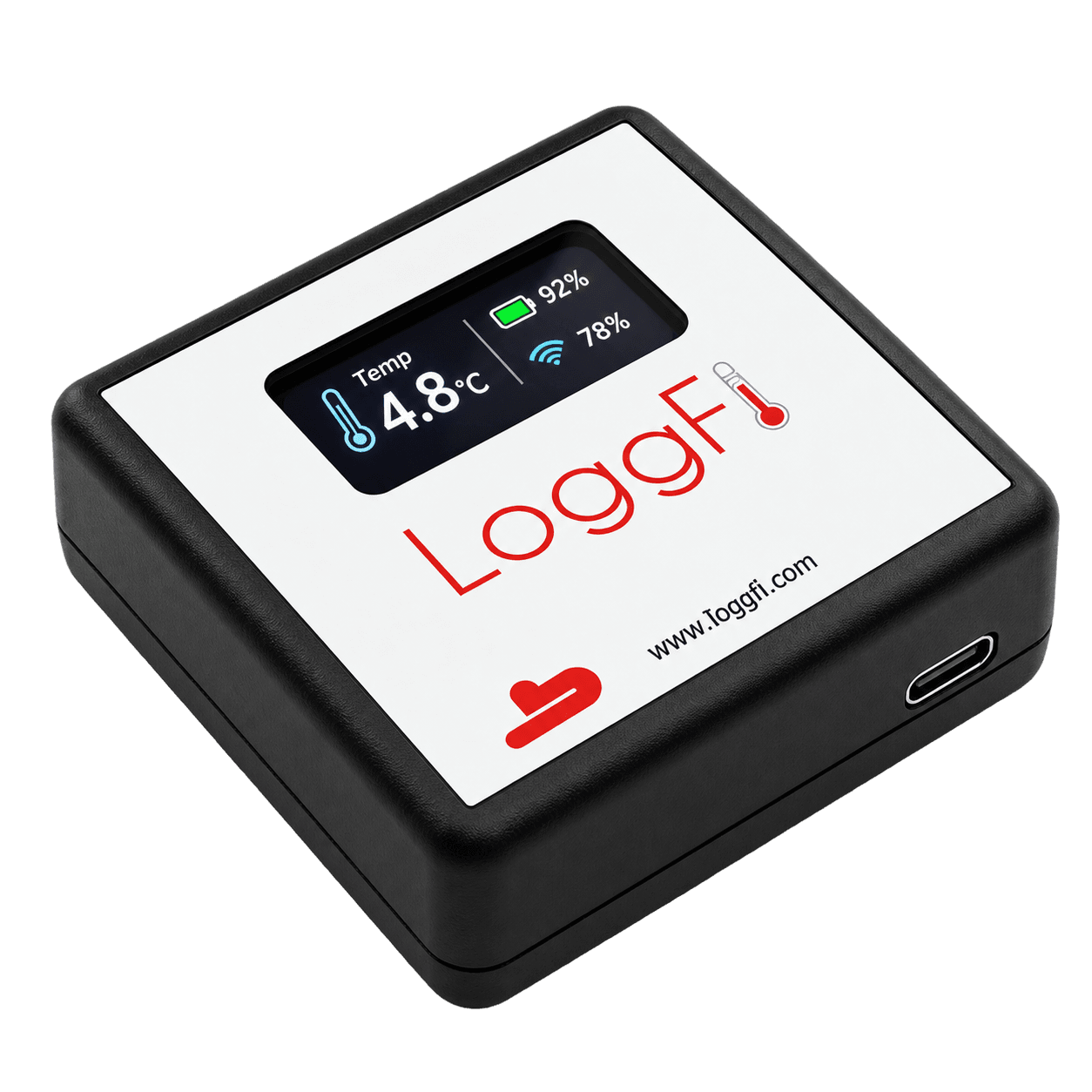
WTD102 has an OLED display; WT102 is the compact version. For PT100 probes, compare WTD102PT and WT102PT. WTD102HM adds humidity monitoring and an OLED display.
What is the price of a WiFi data logger in India?
Request a configuration-specific quote from LoggFi. Share the number of monitoring points, temperature range, display preference and calibration requirements. Ask for device, cloud service, installation and tax costs to be itemised.
Is a calibration certificate included with every logger?
Confirm this in the quotation. The catalogue lists internal / NABL calibration options, but does not specify a certificate for every supplied configuration. Ask which probe and logger are covered, which temperature or humidity points are tested, and whether calibration and later recalibration are separately charged.
What warranty and support are included?
A standard warranty duration and detailed coverage are not published on this page. Ask LoggFi to confirm the term, exclusions, coverage of the probe and battery, repair or replacement process, support hours and any service charges in writing before ordering.
Discuss your monitoring requirement
Tell us your temperature range, number of monitoring points, facility location and calibration needs.